The Easiest Way for Teens to Start Coding
A step-by-step, 4-week path for teens with zero experience, from block coding to Python, with real school-life examples and safety tips.
The Easiest Way for Teens to Start Coding

1. Sound Familiar?
Ever forgotten a homework deadline? Or argued with your group about who presents first? What if you had your own little program that says, "Hey, you have an assignment due tomorrow!"
Programs like that are easier to build than you think. This guide is for middle and high school students with zero coding experience. The goal is that in 4 weeks you'll have built a small program yourself.
2. Why Coding Matters for Teens
You build problem-solving skills. Coding means breaking a big problem into small steps. That helps with math, study plans, and group projects too.
You understand the world you use every day. Apps, games, social media, and AI chatbots are all made of code. Even a little knowledge helps you ask smarter questions, like "why does my feed keep showing me this?"
You can explore your future. Design, medicine, science, art, and business all use data more and more. Trying to code shows you early whether you enjoy it.
It helps with school activities. "I actually built this" is a strong story for clubs and projects. (How schools and colleges value this varies, so ask your teacher or counselor.)
3. The Core Idea: Coding Is Writing Very Careful Instructions
Coding = telling a computer what to do, step by step, very precisely. Computers seem smart, but they never do anything you didn't tell them. Imagine explaining how to make instant noodles to a robot.
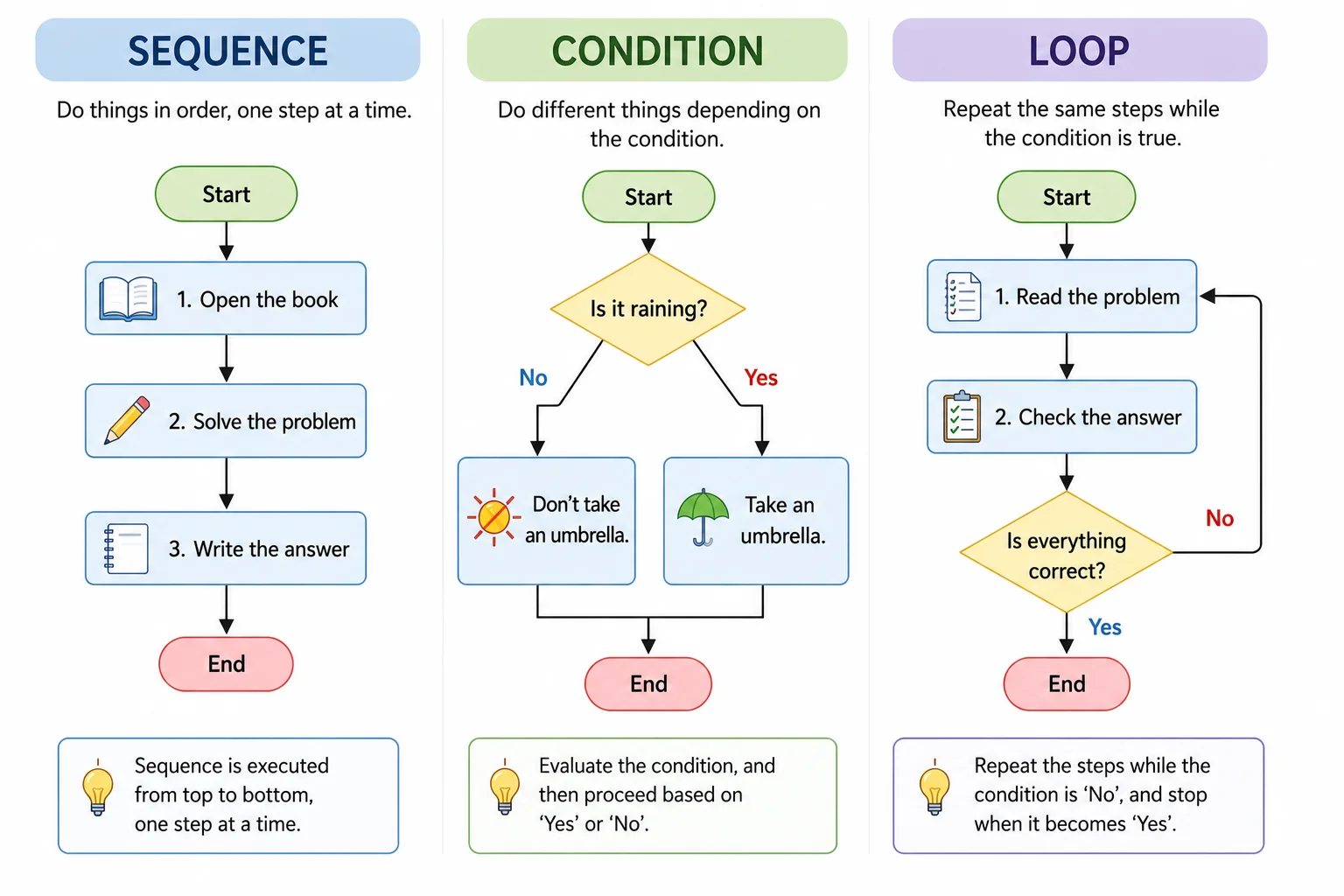
You only need four ideas to begin:
Idea | Simple meaning | School example |
|---|---|---|
Sequence | Run steps top to bottom | Arrive → pack bag → first class |
Condition | "If this, then that" | If it rains, take an umbrella |
Loop | Repeat something | Write a vocab word 10 times |
Variable | A labeled box that holds a value | Store my math score in |
These four can already build a lot.
4. How to Use It in School Life
Study: exam countdown, vocab quiz, a log of questions you often get wrong
Friends: random presentation order, group maker
Daily life: allowance tracker, screen-time log
Clubs and events: a club website, a simple class game
Career exploration: collect data on a topic you love (sports, weather, music) and turn it into a chart
5. Four Real-Life Examples
Example 1: "How many days until the exam?" countdown (a made-up case: Jimin, grade 10)
Jimin kept mixing up test dates. After building a program that shows the days left, planning each day became much easier.
Example 2: Presentation order picker (a made-up case: Hajun, grade 8)
Hajun's group always argued over who goes first. They built a tool that randomly orders names. "The program decided, so it's fair," and the arguments dropped.
Example 3: Grade calculator
Enter each subject's weight and your score, and it tells you how many more points you need for your target. It's a perfect way to practice conditions and variables.
Example 4: A small info page or alert (a bigger challenge)
Later you can move on to simple web pages or public data. Just don't build anything that contains other people's personal information (see section 7).
The people above are fictional examples made to help you picture it.
6. A 4-Week Beginner Roadmap
What you need
A computer or tablet, internet, and 20–30 minutes a day
Week 1: Get the feel with block coding
Scratch: a free block-based tool where you snap blocks together, made at MIT.
Entry: a free block-coding platform (Korean-made, popular in Korean schools).
Mission: make a character move, and speak when you press the space bar
Week 2: Learn conditions and loops
Mission: build a number guessing game (the computer picks 1–10, you guess)
Week 3: Try text code with Python
Python reads a lot like English, so it's often recommended for beginners. You can run it in your browser with a free online code editor, with nothing to install.
Type this exam countdown yourself:
from datetime import date

exam_day = date(2026, 10, 12)   # change to your exam date
today = date.today()
left = (exam_day - today).days

if left > 0:
    print("Days until the exam:", left)
elif left == 0:
    print("Exam day is today. You've got this!")
else:
    print("The exam has already passed.")
Read it line by line. It has a variable (exam_day) and a condition (if). Real learning happens when you change the date and rewrite the messages in your own style.
Week 4: Finish your own mini project
Pick one example from section 5 and finish it
Show a friend and ask for feedback
When you get stuck
Read the error message. The last line usually has a hint.
Check line by line. Use
print()to see values along the way.Search or ask an AI, but ask why, not just for the answer.
Using AI like a coding tutor
Good question: "Explain why line 6 gives an error, like I'm new to coding."
Weak question: "Write my whole homework." (You won't improve, and it may break school rules.)
AI can be wrong. Always run the code and check it yourself.
7. Things to Watch Out For
Never put personal information into AI chats or code-sharing sites. That includes your name, school, class, phone number, address, face photos, and passwords. Once shared, it can be hard to take back.
Don't write passwords or API keys in your code. If you share the code, they're exposed.
Check age limits and guardian consent. Terms differ by service. In many places, younger teens need a parent's or guardian's permission, so read the terms and talk with a guardian if needed.
Don't install software from unknown sources. "Free hacks" and cracked programs can hide malware. Download only from official sites.
Respect others' code and images. Learning from them is fine, but copying and submitting as your own can break copyright and school rules. Check licenses and give credit.
No hacking, and no entering friends' accounts. Even out of curiosity, it can be illegal. Use your skills to build.
Take care of your body. Rest 10 minutes after every 50, and watch your eyes and posture. No all-nighters.
Let go of perfection. Errors aren't failure. They're everyday life in coding.
8. Key Takeaways
Coding is telling a computer what to do, step by step.
Sequence, condition, loop, and variable are enough to start.
Follow this order for 4 weeks: block coding (Scratch/Entry) → Python → mini project.
Start with problems from your own life (countdowns, presentation order, grades) and you'll stick with it.
Treat AI as a teacher who explains, not a machine that does your work.
Always protect personal info and passwords, respect copyright, and read the terms.
9. Good to Know Next
Next steps: web pages (HTML/CSS/JavaScript), simple games, charts from data
Helpful company: coding clubs, school activities, coding contests. Eligibility and dates change every year, so check the official announcements.
Free learning sites (examples): Scratch, Entry, Code.org, freeCodeCamp, Khan Academy, MDN Web Docs. Content and policies can change, so check before you sign up.
Keep going: 20 minutes every day beats 5 hours crammed on the weekend. Keep a log of each small thing you build.
Try one thing today: open Scratch or Entry and make a character move once. That's the start.